Bring custom households, mods, and player-made creations into your Paralives world with ease.
How to Add Imported Characters in Paralives
To import characters created by other players, head to the Paralives page on Steam and open the Workshop section. From there, you can browse through a huge collection of households, custom characters, houses, and mods shared by the community.
When you find a household you want, click the “+ Subscribe” button. Steam will automatically download the selected creation to your game.
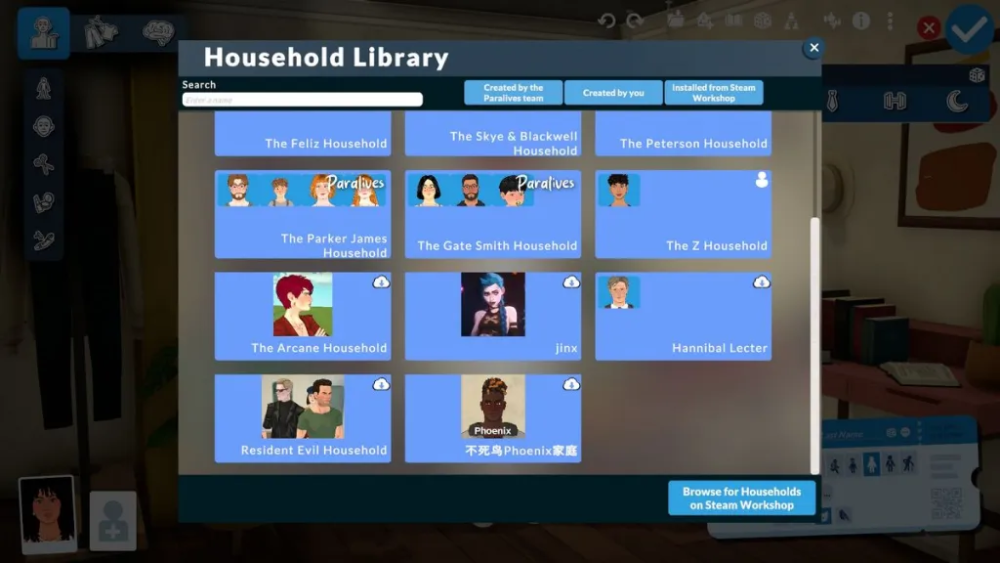
Some households include a single character, while others may contain entire families or groups of characters.
If Paralives is currently running while you subscribe to Workshop content, make sure to restart the game so the new creations appear properly.
Importing a Character in an Existing Save File
If you already have a save file, load into your current playthrough first. Open the main menu and select “Create a New Household.” This will take you to the household creation screen.
At the top of the menu, look for the “Household Library” icon, which appears as a small house with a plus sign.
Inside the Household Library, you’ll find all available households in your game, including the ones downloaded from the Steam Workshop. Select the household you want to use and choose “Play with Household.”
After that, you can move the imported household into any available home in your town.
If you only want the household to exist in your world without actively playing them, simply switch back to your original household afterward. The imported characters will remain in town and can still interact with your main household.
Importing Characters in a New Playthrough
If you are starting a brand-new game, you can still import Workshop households using a similar method.
Begin by creating your own character if you do not want to directly play as an imported household. Complete or skip the tutorial, then move your starting character into a home.
Next, open the main menu again and select “Create a New Household.” From there, access the Household Library and choose any subscribed household from the Workshop.
Once selected, place them into an available house and continue your playthrough normally.
How to Add Mods and Houses in Paralives
To manage mods, lots, and Workshop houses, return to the game’s main menu and select “Mods.”
This section opens the control panel for mods, households, and lots. Any content you subscribed to through the Steam Workshop should automatically appear here after downloading.