
Warhammer 40K Darktide’s latest update is now live, introducing the Hive class, quality-of-life improvements, and more. Alongside this, Fatshark has launched a new Twitch Drops campaign called “Ogryns of Tertium”, offering exclusive cosmetic skins for players. Here’s how to earn them.
Available Twitch Drops
The following cosmetic items can be earned by watching eligible Darktide Twitch streams:
| Item | Total Watch Time |
|---|---|
| Protector of Tertium Skin – Autopistol | 20 minutes |
| Protector of Tertium Skin – Peesash Hood | 30 minutes |
| Protector of Tertium Skin – Fatigues | 45 minutes |
| Protector of Tertium – Fighter Gear | 60 minutes (1 hour) |
All weapon skins feature a purple and blue pattern. These items can be equipped immediately after claiming.
Twitch Drops Schedule
The Ogryns of Tertium campaign runs from November 28, 2025, to December 20, 2025. You only need one hour of total watch time to unlock all four items, giving plenty of time to complete the campaign.
How to Claim Twitch Drops
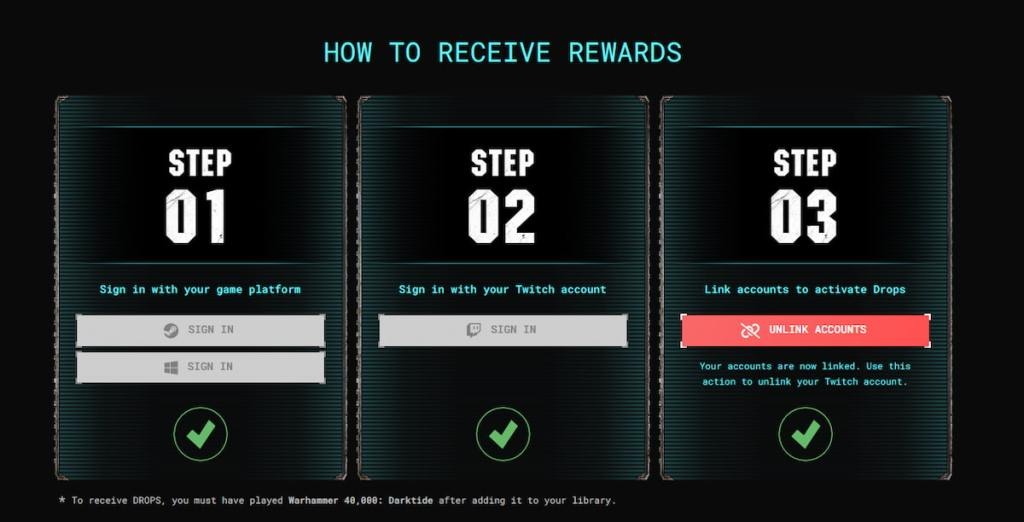
To receive the drops, you must link your platform account with Twitch. Here’s how:
- Visit the Darktide Twitch Drops page and sign in with the account type for the platform you own Darktide on (Steam, Windows, PlayStation, or Xbox).
- Sign in to Twitch through the provided link.
- Link your Twitch account with your Fatshark account.
Once your accounts are connected:
- Watch any Darktide stream with Drops enabled. You can watch actively or have the stream running in the background.
- Track your progress in your Twitch Inventory.
- After reaching the required watch time, click the “Claim Now” button to receive the items.
The skins will automatically appear in your inventory under the cosmetics section of the corresponding weapon. Note that the cosmetics only apply to the specific weapon type mentioned—for example, the Autopistol skin will not work on a Bolt Pistol.
Fatshark often re-enables Twitch Drops during major updates, but this campaign introduces all-new cosmetic items for players this time around.